Import/Export Task Status
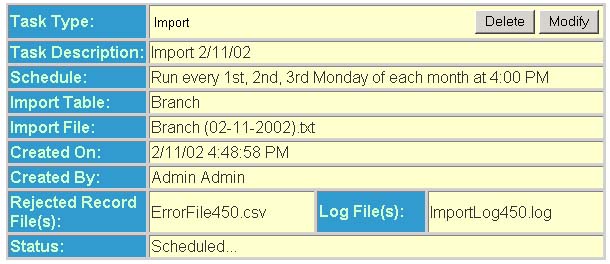
The Task Status page contains the following fields:
Task Type - This field displays the type
of task.
Import - This value indicated in the "Task
Type" field states that the task that was run moved data into the
Policy Terminator® table specified in the "Import Table" field.
Export - This value indicated in the "Task Type" field states that the task that was run copied data out of the Policy Terminator® table specified in the "Export Table" field.
Task Description - This field displays the task description.
Schedule - This field displays the scheduling status.
Import Table - This field displays the table into which the import will occur.
Import File - This field displays the name of the file from which the import will occur. If the import data is Local File it displays the fully qualified path and file name entered by the user.
Export Table - This field displays the table from which the export will occur.
Export File - This field displays a link to the generated export file. The name of the link corresponds to the name entered in the "File" field when creating the export task. Clicking on the link allows viewing in a web browser of the file. Right-clicking on the link, and choosing "Save Target As…" (or "Save As…"), saves the file to a local hard-drive as a text (.txt) file.
Created On - This field displays the date and time the task was created.
Created By - This field displays the user who created the task.
System Scheduled To Delete Task On - This field displays the scheduled date and time for task deletion if the task ran correctly. Recurring tasks are never deleted; however, the associated log and text files are deleted according to the group options setting Delete Task Files after XX Hours.
Rejected Record File(s) - This field displays the name of the rejected record file(s) if the task ran incorrectly. This becomes a link (file name appears underlined) to the rejected record file only if errors occur during task processing.
NOTE: The rejected record file is in comma-delimited format. One can fix the errors in the records and then use this corrected file as the import file.
Log File(s) - This field displays the name of the task processing log file(s). When the process is complete, the file name becomes a link to the log file only if warnings or errors occur during task processing.
Status - This field displays the task
status. The following is a list of the valid status's:
| Status | Description |
| Scheduled for processing | Task is in the queue, and will be processed as soon as possible. |
| Processing record X out of X | Task is executing and has processed X records out of X records. |
| Completed Successfully | Task executed with no warnings or errors. |
| Completed with Warnings | Task executed successfully however the log file contains warnings. Warnings are system messages indicating that a duplicate value existed and the action the system took (Overwrite or Reject). |
| Completed with Errors | Task executed and either some or all of the records failed processing. The log file contains the error message of why the record was not processed, and the rejected records file contains the actual data of the rejected records. |
| Failed | Something fatal happened and the task was unable to execute at all. |
| Scheduled… |
Is a recurring task that is scheduled to run at the specified date and time.
|